Clean. Enhance. Split.

Professional audio processing tools directly in your browser. Remove noise, enhance speech, or split vocals in seconds.

Background noise
removal

No complex software, no expensive gear — just you and crystal-clear audio

Try it now – it's free
StarStarStarStarStar
4.9 from 3,000+ users
App preview

For Perfect Audio

Transform your audio content with cutting-edge AI technology

AI microphone representing crystal clear sound

Crystal-Clear Sound

98% noise reduction

Advanced AI algorithms remove unwanted noise while preserving audio quality. Get professional-grade results without expensive equipment.

Icons representing fast processing

Lightning Fast

Processing from 15 sec

Process your audio and video files in just seconds. Upload, enhance, and download — it's that simple and fast.

Microphone with waveform symbolizing voice isolation

Voice Isolation

Enhanced voice clarity

Highlight and enhance speech for crystal clear voice. Perfect for podcasts, interviews and your audio recordings.

Key Highlights

Headphones icon

Multiple Formats

MP3, WAV, MP4, and more

Lightning icon

Browser Based

No software installation

Speaker icon

Quality Preserved

Original quality maintained

Microphone icon

User Friendly

No technical expertise needed

How It Works

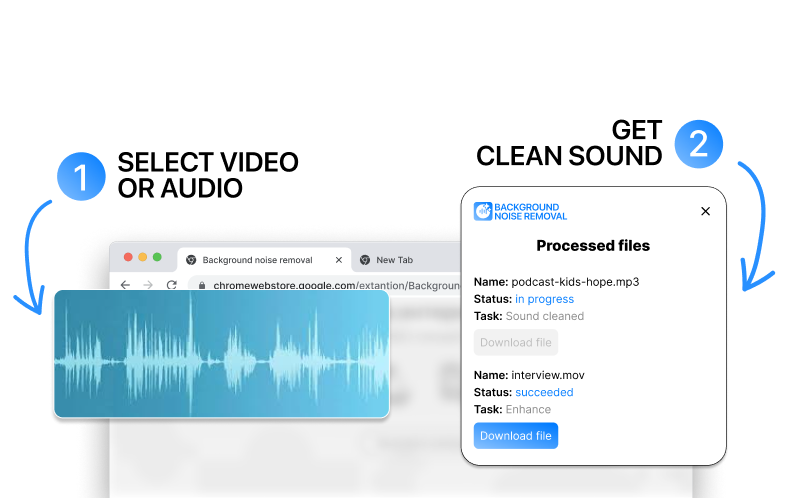
Get professional audio results in just three simple steps. No technical expertise required – just upload, process, and download.

Upload icon

Upload Your Audio

Simply drag and drop your audio or video files. Supports MP3, WAV, MP4, and more formats.

AI icon

AI Enhancement

Our advanced AI automatically detects and removes background noise while preserving voice quality and audio clarity.

Download icon

Download Enhanced

Get your professionally enhanced audio in seconds. Clean, clear, and ready to use for any project or purpose.

Transparent Pricing

Pro

Best quality and no restrictions

$9.9/ month
  • Unlimited files per month
  • No limit on the size of one file
  • High-quality AI noise removal
  • Support for all audio and video formats
  • Extracting voice from music

Frequently Asked Questions

Got questions? We've got answers. Find everything you need to know about our AI‑powered background noise removal service.

How does the AI noise removal work?
Our advanced AI algorithms analyze audio to identify and separate background noise from the main audio content. The technology uses machine learning models trained on millions of audio samples to distinguish between useful sounds (like voice) and unwanted noise (like traffic, wind, or background noise).
What audio formats are supported?
We support all popular audio and video formats, including MP3, AAC, OGG, WAV, M4A, FLAC, MP4, AVI, MKV, WEBM, MOV. The Chrome extension automatically detects the format and processes it accordingly, preserving the original quality and removing noise.
Will this affect the voice quality?
No, our AI is specifically designed to preserve and enhance the voice quality while removing background noise. Algorithms are trained to distinguish between speech and noise, ensuring your voice sounds clear, natural, and professional.
Can I cancel my subscription at any time?
Sure! You can cancel your subscription at any time in your account dashboard. You will continue to have access to premium features until the end of your current billing period. There is no cancellation fee.

Get in Touch

Have questions about our audio enhancement service? Need technical support? We're here to help you succeed.

Send icon

Send us a Message

Fill out the form below and we'll get back to you as soon as possible.

By submitting this form, you agree to our Privacy Policy and Terms of Service.